Staff and payroll
Everyone gets a login, and only the screens they need
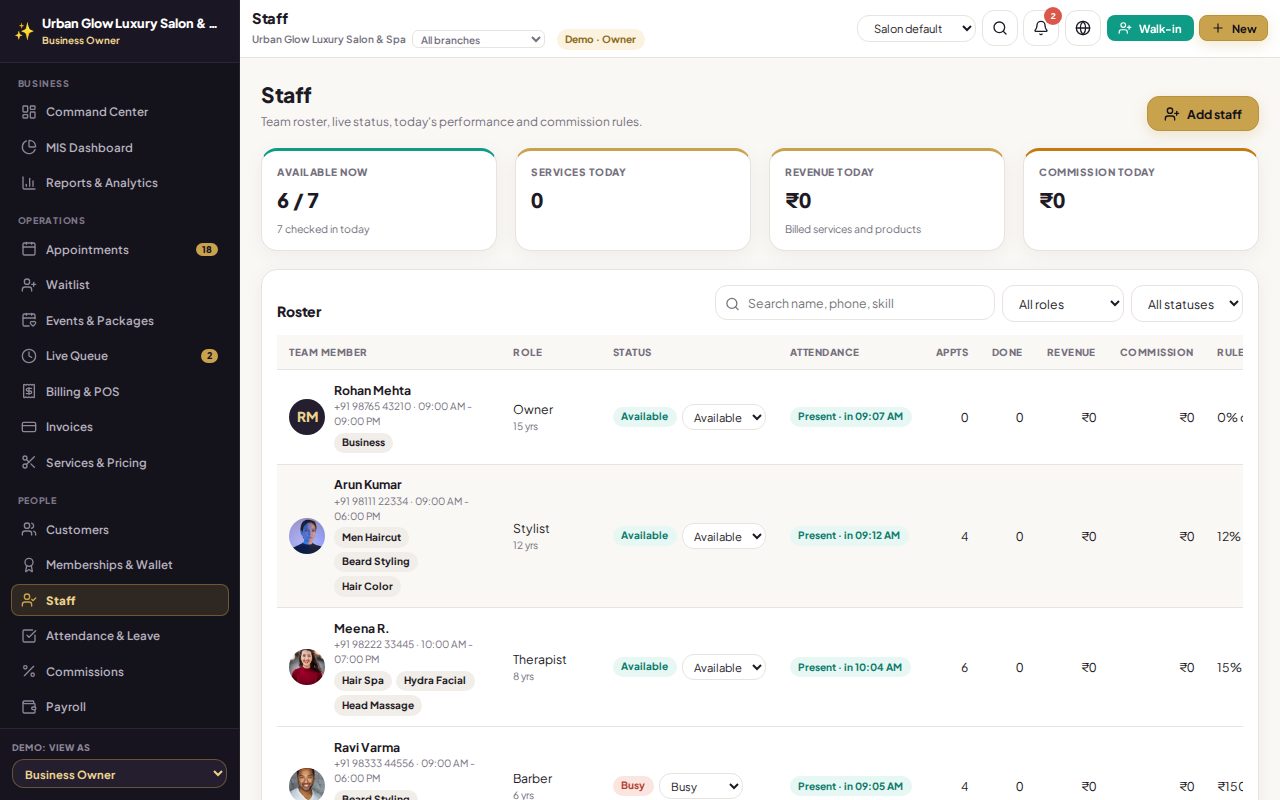
Keep each person’s skills, shift, branch, commission and salary in one profile. Give them their own login, and decide screen by screen what managers, receptionists and stylists can see.
Opens the demo as the salon owner. It runs in your browser with sample data, so try anything.
What it does
- Staff profiles with role, specialisations, shift hours, branch, commission and base salary.
- Live status: available, busy, on break or off, with today’s attendance.
- Own logins for managers, receptionists and stylists, with a temporary password changed at first sign-in.
- Access by screen. Turn each screen on or off for managers, receptionists and stylists; the server enforces it too.
- Salaries stay private from roles without staff or payroll access.
- Deactivate without losing history: past bills, attendance and paid salaries are kept.
Try it in the demo
The demo team has seven people across every role.
Open a stylist’s profile to see their commission and salary.
In Settings & Access, turn a screen off for receptionists.
Switch the demo to Reception Desk with the role picker and see the menu change.
Works together with
See it with your own services and staff
Tell us about your business and we'll set up a walkthrough, or keep exploring the demo on your own.