Staff and payroll
Salaries worked out for you every month
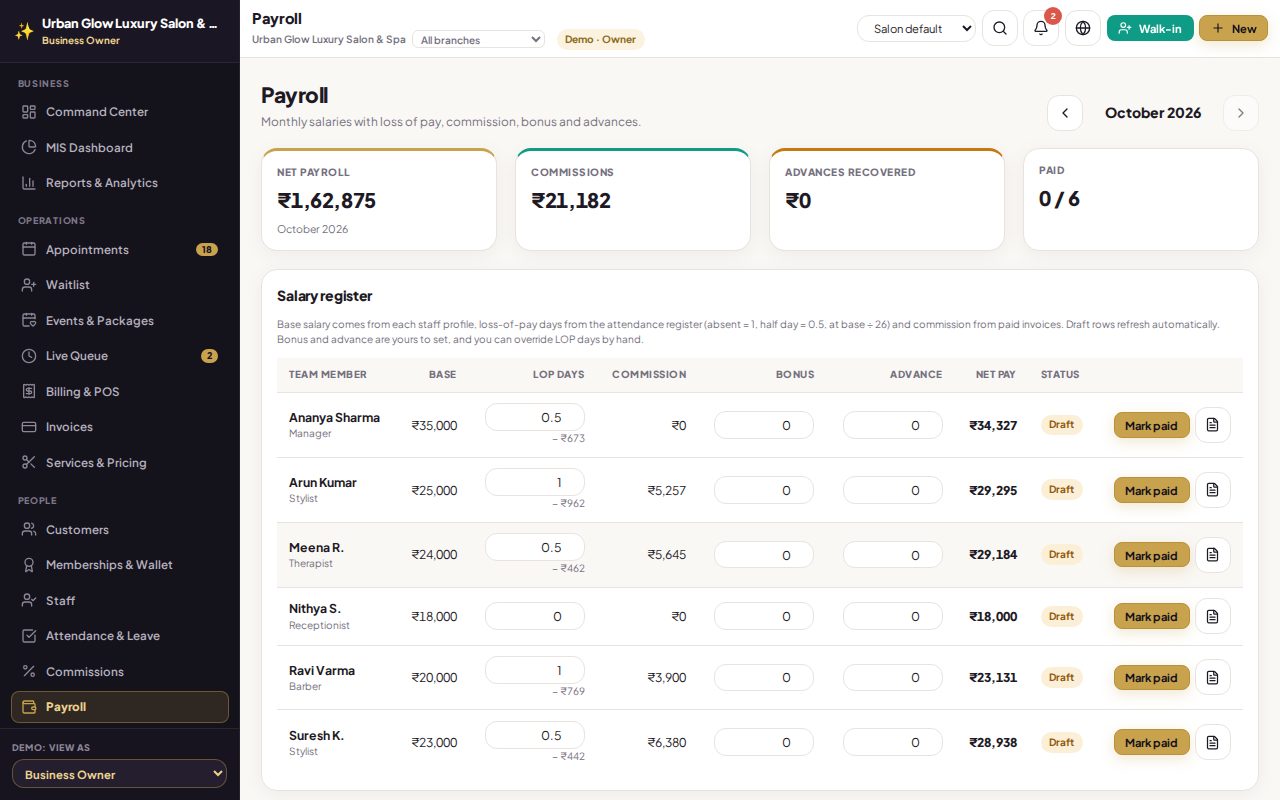
Payroll takes each person’s base salary, takes off unpaid days from the attendance register, adds commission from paid bills, and lets you add a bonus or an advance. Mark it paid and it is locked.
Opens the demo as the salon owner. It runs in your browser with sample data, so try anything.
What it does
- Net pay = base salary − loss of pay + commission + bonus − advance.
- Loss of pay from attendance: an absence is a day, a half day half a day, on a 26-day month.
- Always current until paid: it follows the staff profile, the register and paid bills; loss-of-pay days can be overridden.
- Bonus and advances entered by the owner.
- Mark paid with the payment method: the figures are frozen and a salary expense is added to your profit and loss.
- Printable payslips.
Try it in the demo
The demo works out this month’s payroll for the team from its attendance and bills.
Open one person and see base, loss of pay and commission.
Add a bonus and watch net pay change.
Press Mark paid, then find the salary in Expenses & P&L.
Works together with
See it with your own services and staff
Tell us about your business and we'll set up a walkthrough, or keep exploring the demo on your own.