Billing and money
Profit and loss you can check any day
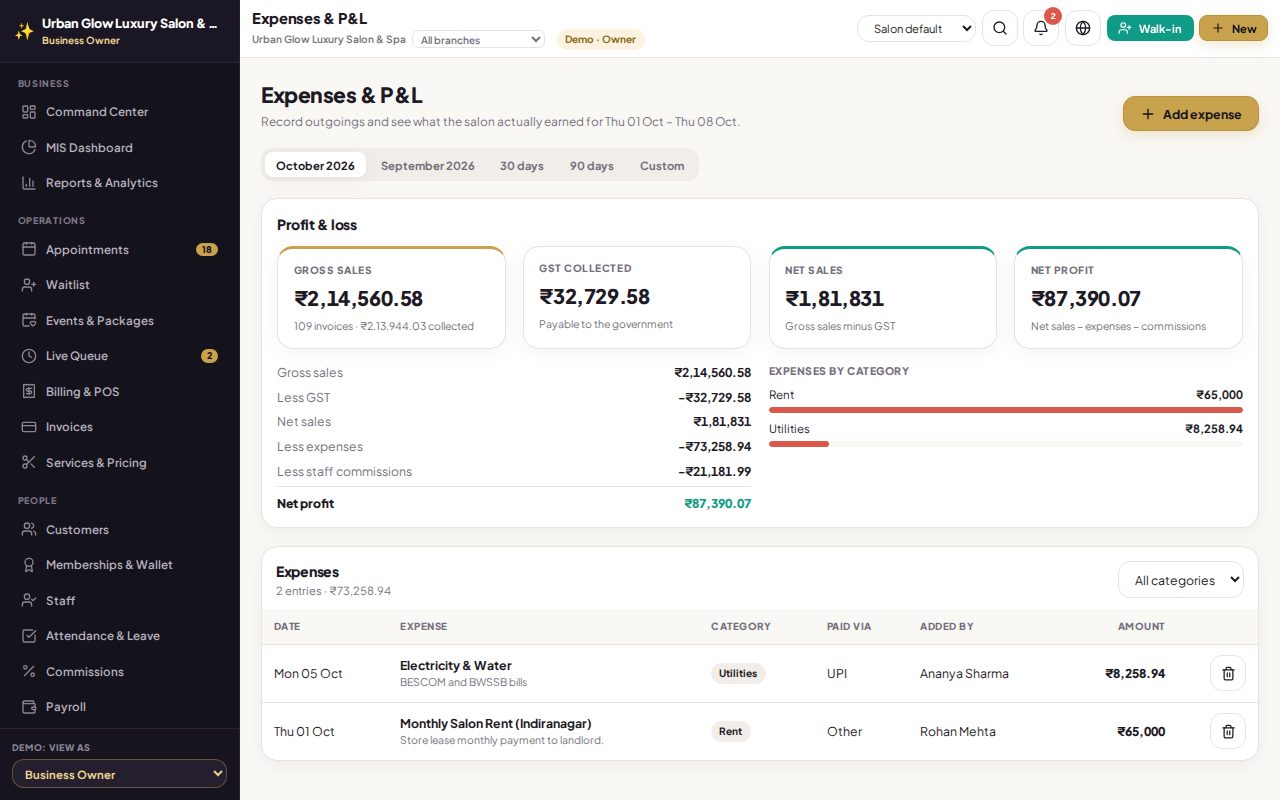
Note rent, salaries, supplies and the rest as you pay them. Pick any period to see sales, tax you owe, what you spent, commissions paid and what is left.
Opens the demo as the salon owner. It runs in your browser with sample data, so try anything.
What it does
- Eight categories: rent, salary, utilities, inventory, marketing, maintenance, equipment and other.
- Any period: presets or your own from and to dates.
- Profit and loss: sales, less tax, less expenses, less staff commissions, equals net profit.
- Tax payable shown separately, so you know what is owed.
- Spending by category as a chart, with the list below.
- Owner only.
Try it in the demo
The demo has this month’s rent, utilities and a stock purchase already recorded.
Switch the period to last month and compare net profit.
Add an expense and see the profit change.
Works together with
See it with your own services and staff
Tell us about your business and we'll set up a walkthrough, or keep exploring the demo on your own.