Customers and growth
Stop losing enquiries before they book
Note who asked about what, give it to someone, and set a day to call back. When they say yes, book the appointment or the wedding package from the enquiry itself.
Opens the demo as the salon owner. It runs in your browser with sample data, so try anything.
What it does
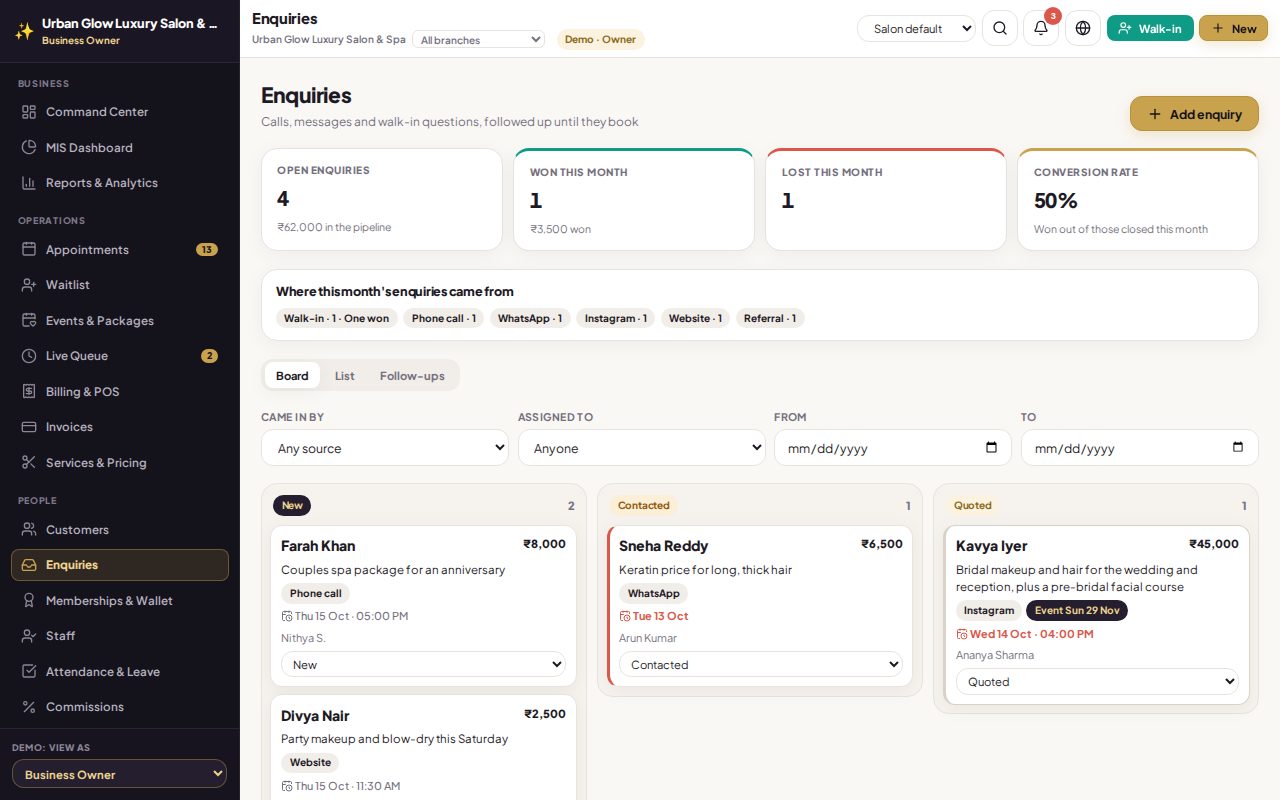
- Every enquiry in one place: name, phone, where it came from (walk-in, phone, WhatsApp, Instagram, website, referral), what they asked about, services, event date and estimated value.
- Matched to your customers by phone number, or added as a customer when they book.
- A board and a list: move an enquiry from New to Contacted, Quoted, Won or Lost from a menu; filter by status, source, staff member and date.
- Lost needs a reason, so you can see why enquiries do not turn into bookings.
- Follow-ups: a call-back date and time for an enquiry or a customer, with overdue, today and upcoming lists for each staff member, and everyone’s for owners and managers.
- Reminded in the app: whoever has a follow-up due today gets a notification, and overdue ones show as a count in the menu.
- Book from the enquiry: open a booking or an event package with the customer filled in; it is linked and marked won.
- This month’s numbers: open enquiries, won and lost, conversion rate, value won and where enquiries came from.
- Message on WhatsApp from your own number with a pre-filled first line.
Try it in the demo
The demo salon has enquiries in every status and follow-ups due today.
Open Follow-ups and tick off today’s call-back.
Open the bridal enquiry and press Book appointment.
Move another enquiry to Lost and give a reason.
Works together with
See it with your own services and staff
Tell us about your business and we'll set up a walkthrough, or keep exploring the demo on your own.